
Buttons
Prompt “Build me a button set: primary, outline, icon-only, delete, with hover, focus, loading, and disabled states.”
evon:ui-ux reads your codebase and shows a brief and 2–3 wireframes for you to pick from. Only then does it build, with your project's own components, and check its work with a script.
/evon:ui-ux Redesign the jobs page.Works with
Passed 70 test prompts from a single button to full pages
Counted from the skill's test list, Sep 29, 2026.
0109Features
What it does
No commands to memorize. The skill reads your prompt and works out what to do. By default it works like a designer; if you want something else, just say so.
By default the skill goes through every designer step. Tell it to skip the wireframes to save tokens. Building several screens? Lock in a design system first. Anything smaller than a screen, it just does.
The default whenever you ask for a screen to be built or redesigned. It writes a brief, works out what the screen is for, and shows 2–3 wireframes with real content. It builds once you pick.
Sample prompt
/evon:ui-ux Redesign the jobs page.Saves tokens. The skill picks the option it thinks fits best and builds it straight away. At handover it tells you which layout it chose and why.
Sample prompt
/evon:ui-ux Build the notification settings screen, just build it.Locks in color, type, spacing, and seven base components on one page. Approve it once, and every later screen is built from that set. Already on shadcn or your own kit? The skill tunes that instead.
Sample prompt
/evon:ui-ux Build a design system for a clinic management app first, no screens yet.Fix a component, add a dropdown, fix a bug, change a color. The skill still reads your codebase first, then just does it, no wireframes.
Sample prompt
/evon:ui-ux Add a status filter dropdown to the orders table.All four start by measuring your page. They differ in how much the skill is allowed to change.
Give it a localhost link. It opens the page, measures from 375 to 1920px, and sends back an issue table with before / after shots. It only fixes after you reply “fix 1, 3”.
Sample prompt
/evon:ui-ux What's wrong with this page: http://localhost:3000/ordersKeeps your page layout and colors. Swaps home-made controls for proper components and tidies each card. Reply “ok” or “drop 7”.
Sample prompt
/evon:ui-ux Rebuild this page and keep the brand.Like keeping the brand, but the colors switch to the skill's tokens too. Only your logo and main accent stay.
Sample prompt
/evon:ui-ux Rebuild this fully in the skill's taste, drop the old style.A Light / Dark / System toggle that remembers the choice and never flashes white on load. The skill switches colors through tokens, then re-checks tables, forms, overlays, and charts on dark. Tested on one real project, 7/7 items.
Sample prompt
/evon:ui-ux Add dark mode to the app, with a light / dark toggle in the header, following the OS by default.Only the code underneath changes. The interface stays exactly the same.
Swaps classes, deletes unused CSS, and compares screenshots before and after so not a pixel shifts. This part is new and hasn't been tested yet.
Sample prompt
/evon:ui-ux Refactor the /settings CSS to Tailwind and keep the UI identical.0209Process
Designer mode
Ugly screens are usually a structure problem, not a color problem: overloaded cards, filters far from the table, two buttons fighting. A designer catches these at the wireframe, before fixing them costs anything.
Reads the repo, README, and routes first. Only asks what it can't find out on its own.
Why people come here, what they compare, and what they click at the end.
Stop 1: you edit the brief or reply “ok”
Options that differ in layout, not just in color. Real content, and every block is numbered so feedback is easy.
Stop 2: you pick, e.g. “C + D”
Codes the option you picked, with your project's own components. Runs the check script and fixes what it finds, up to three rounds. Anything left gets explained at handover.
Why option A
RecommendedRight on the wireframe you can switch options, turn on color, try accents, check mobile, see the empty and error states, read pros and cons, and copy feedback by block number.
0309Before / after
A real screen
The 68Lane room listing screen in three steps: the original, the wireframe the skill offered to pick from, and the screen built from it. Drag the handle to compare.
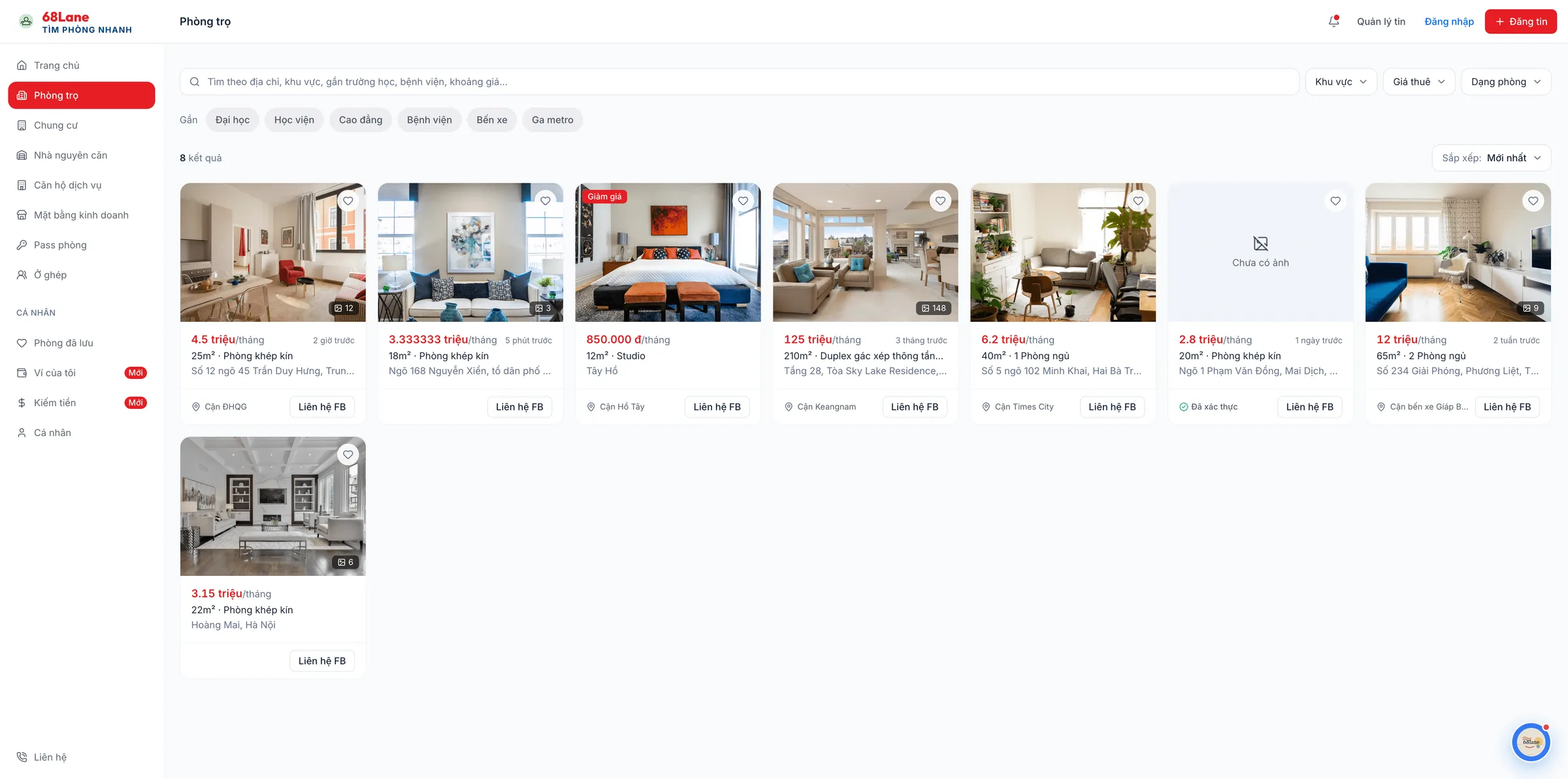
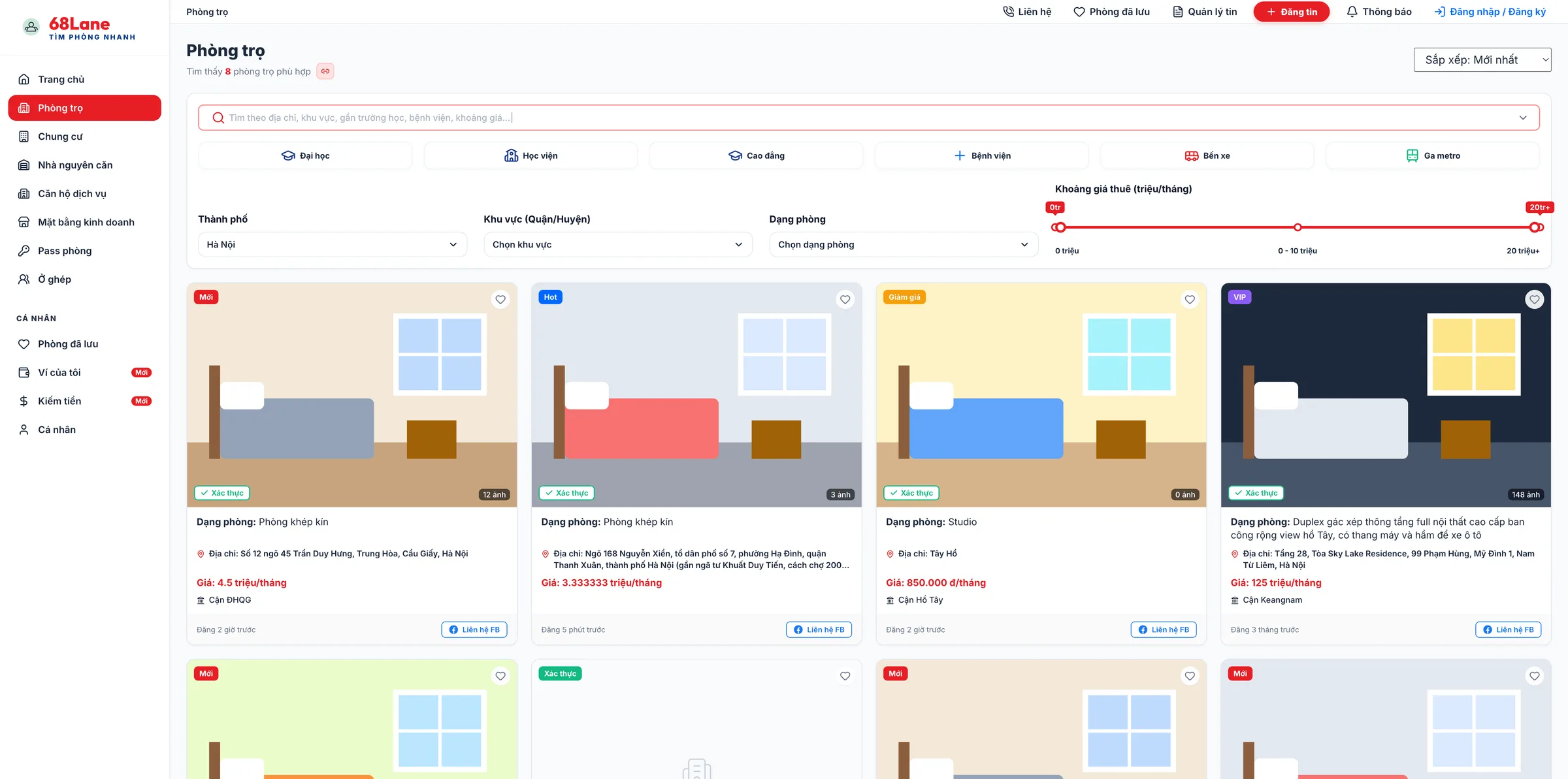
Drag across the frame, or focus the handle and use the ← → keys.
0409Review and measure
Check script
The script opens the real page, hovers, tabs through, opens every menu, measures contrast, and tries every screen width. Every issue it reports goes in the table, or gets a written reason for being skipped.
| # | Issue | Proposed fix |
|---|---|---|
| 1 | Secondary text at 3.2:1 on cards Broken | Use a muted color at 4.6:1 |
| 2 | Nav wraps at 860–1000px Broken | Move secondary items into a menu |
| 3 | Three corner radii on one card type Off-system | Back to the project's radius |
| 4 | Two filled buttons competing Taste | Keep one primary, outline the other |
You reply: fix 1, 2
| Check | 1920 | 1440 | 1280 | 1024 | 768 | 375 |
|---|---|---|---|---|---|---|
| Text contrast ≥ 4.5:1 | ||||||
| No horizontal scroll | ||||||
| Nav stays on one line | ||||||
| Popovers stay on screen | ||||||
| Hover is visible |
Sample report. The script also checks selected items, focus rings, and the state right after a click.
0509Showcase
Built screens
Each tile shows the original prompt and the screen the skill built from it, captured as-is. You can still customize it however you like afterward.
Prompt “Build me a button set: primary, outline, icon-only, delete, with hover, focus, loading, and disabled states.”
Prompt “Build me order status badges: pending, shipping, delivered, cancelled.”
Prompt “Build me a date picker, and a date range picker with presets for 7 days, 30 days, and this month.”
Prompt “Build me a chart set: monthly revenue line, grouped comparison bars, a proportion donut, and a small sparkline in a stat card.”
Prompt “Build me an invite-member modal with a form inside and cancel and send buttons.”
Prompt “Build me an order activity timeline: created, confirmed, packed, shipped, with one failed delivery step.”
Prompt “Build me a document folder tree with collapsible branches, an empty folder, and a very long file name.”
Prompt “Build me a comment section with nested replies, a deleted comment, and a comment that's still sending.”
Prompt “Build me a recipient email input where Enter turns each address into a tag, including an invalid email.”
Screens shown in Vietnamese. The skill writes UI copy in your project's language.
0609Taste
The skill's taste
Each rule lives in one file, and many came from bugs found in testing. Here are four you can see on screen right away.
P6 · M12
Light gray page, white cards. No gradients or glass effects just for looks.
M3 · I1 · I3
Buttons are outlined by default. Each area gets one button filled with the accent, so the one that needs to stand out actually does.
M13 · M15
Cards on the page are separated by a 1px border. Shadows are only for things that float above the page, like modals and dropdowns.
R1 · T15
Long labels wrap, and the page never scrolls sideways.
Flat gets the most care. Other styles keep the same contrast and hierarchy but are less polished. If your project already has its own style, the skill follows it and tells you when it hands over.
0709Install
Install
Pick the tool you use. All of the skill's testing ran on Claude Code.
Add the marketplace, then install the evon plugin.
/plugin marketplace add evondev/evondevKit/plugin install evon@evondevkitInvoke the skill with this command, or just write a prompt: it turns on when the prompt is about app UI.
/evon:ui-uxPull the latest version when a new release is out.
/plugin marketplace update evondevkitRun one of these in your project root: npx if you have Node, bunx if you use Bun. The skill lands in .agents/skills/; add -g to install it for every project.
npx skills add evondev/evondevKit -a cursorbunx skills add evondev/evondevKit -a cursorInvoke the skill with this command in the Agent chat, or just write a prompt: it turns on when the prompt is about app UI.
/ui-uxPull the latest version when a new release is out, again with either command.
npx skills updatebunx skills updateRun one of these in your project root: npx if you have Node, bunx if you use Bun. The skill lands in .agents/skills/; add -g to install it for every project.
npx skills add evondev/evondevKit -a codexbunx skills add evondev/evondevKit -a codexInvoke the skill with this command (or pick it from /skills), or just write a prompt: it turns on when the prompt is about app UI.
$ui-uxPull the latest version when a new release is out, again with either command.
npx skills updatebunx skills updateRun one of these in your project root: npx if you have Node, bunx if you use Bun. The skill lands in .agents/skills/; add -g to install it for every project.
npx skills add evondev/evondevKit -a opencodebunx skills add evondev/evondevKit -a opencodeJust write a prompt: the skill turns on when the prompt is about app UI. To be sure, start the prompt with "use the ui-ux skill".
Pull the latest version when a new release is out, again with either command.
npx skills updatebunx skills updateRun one of these in your project root: npx if you have Node, bunx if you use Bun. The skill lands in .agents/skills/; add -g to install it for every project.
npx skills add evondev/evondevKit -a antigravitybunx skills add evondev/evondevKit -a antigravityInvoke the skill with this command, or just write a prompt: it turns on when the prompt is about app UI.
/ui-uxPull the latest version when a new release is out, again with either command.
npx skills updatebunx skills updateRun one of these in your project root: npx if you have Node, bunx if you use Bun. The skill lands in .zcode/skills/; add -g to install it for every project.
npx skills add evondev/evondevKit -a zcodebunx skills add evondev/evondevKit -a zcodeInvoke the skill with this command (or pick it from the / menu), or just write a prompt: it turns on when the prompt is about app UI. If the skill doesn't show up, open Settings → Skills and click Refresh.
$ui-uxPull the latest version when a new release is out, again with either command.
npx skills updatebunx skills update0809Coming soon
Roadmap
Things I'm not promising yet. Until testing is done, this page won't say they're there.
Hero, features, pricing, FAQ. Sections picked by what visitors should do: start a trial, buy now, book a demo, or join a waitlist.
Not taught yet, still does it if asked
Product listings, product pages, cart, checkout.
Not taught yet, still does it if asked
Post lists and reading pages: type size, line length, table of contents, code blocks.
Not taught yet, still does it if asked
Take input focus: right now the skill uses a ring. I'm trying an underline-only style with no ring, plus a few others, so you can pick the one that fits your app.
Researching
0909FAQ
FAQ
Yes, as a beta. Light-theme app screens have passed 70 test prompts on real projects. Dark mode for an existing app has been tested on one project. I haven't tested Cursor, Codex, OpenCode, Antigravity and ZCode myself yet, so if you hit a bug there, let me know. If something looks off, open a GitHub issue with a link or a screenshot of that screen. Get the latest version with /plugin marketplace update evondevkit (Claude Code) or npx skills update (other tools).
The skill isn't perfect. It does its best within its rules, but taste differs from person to person and every project has its quirks. Once it's built, edit by hand or ask the AI to change it, whichever you like. Talk to it like you'd give feedback to a designer: “bolder headings”, “more breathing room”, “drop block 3”.
Yes. The skill is open source under the MIT license.
Designer mode stops exactly twice: to approve the brief and to pick a wireframe. Everywhere else it takes a default and tells you when it hands over. Say “just build it” to skip the wireframes too. Building a design system first stops only once, for you to approve the design system page.
One sentence is enough to start, and every prompt on this page is that short. The skill reads your codebase and gives you a brief to adjust before it builds. For a closer result, add who uses the screen, the main thing they do there, and what the real data looks like (a few sample rows, which columns matter). Skip words like “beautiful” or “modern”, the skill already takes care of that.
The skill uses your components. With shadcn, Radix, MUI, Ant, or an in-house kit, it uses those and only adjusts tokens to fit. Your brand colors stay unless you say “drop the old style”.
No. If your project uses CSS Modules, SCSS, or styled-components, it follows that. For plain HTML, WordPress, or PHP, it translates its samples into HTML and classes first.
Yes, as a beta. Adding dark mode to an existing app has been tested on one real project, all 7 items (theme toggle, tables, app shell, overlays, forms, charts, sign-in screen). By default the skill still builds light screens; it only does dark mode when you ask. Everyone's taste in dark themes differs, so if you want changes after it's built, just say so.
It will if you ask, but it hasn't been taught them yet. The skill is taught for screens inside an app: dashboards, lists, tables, forms, settings, modals, and pages people browse to choose something, pricing tables included. For landing pages, e-commerce, and blogs, it tells you so in one line before it starts. I'm working on these, see Coming soon.
Prompts in English work the same way, and UI copy follows your project's language. The skill's own rules are written in Vietnamese and the English test round hasn't run yet, so treat English output as early.
Get started
Install it in Claude Code, Cursor, Codex, OpenCode, Antigravity or ZCode, then write your prompt like you're talking to a designer. Free and open source under MIT.
/plugin marketplace add evondev/evondevKit/plugin install evon@evondevkit